Writing Unit Tests for a REST API With Kotlin and JUnit 5: Configuration
After we have finished this lesson, we:
- Understand how we can remove duplicate code from our test suite.
- Can configure the system under test by using the standalone configuration.
This webinar assumes that:
- You can run Kotlin tests with Maven or Gradle
- You can write test classes with JUnit 5 and Kotlin
- You can create test doubles with MockK
- You can configure the Spring MVC Test framework by using the standalone configuration
- You can configure the Spring MVC Test framework when you are writing unit tests for a REST API
Get the source code from Github
Removing Duplicate Code From Our Test Suite
We don’t want to add duplicate code to our test suite because it makes our tests hard to write and maintain. During this lesson we will learn two techniques which help us to remove duplicate code from our test suite when we are writing unit tests for Spring MVC controllers.
Next, we will learn how we can create the components which override the default configuration provided by the Spring MVC Test framework.
Creating the Additional Components
As we remember , if we create the required components in our test classes, we add duplicate code to our test suite because it’s likely that multiple test classes use the same configuration. That’s why we have to create an object mother class that creates the required components. We can create our object mother class by following these steps:
First, we have to create a new class and ensure that we cannot instantiate the created class. After we have created this class, its source code looks as follows:
1class WebTestConfig private constructor () {
2
3}
Second, we have to write the static factory functions which create and configure the required components. We have to add three static factory functions to our object mother class:
- The
fixedLocaleResolver()function returns a newFixedLocaleResolverobject that always returnsLocale.ENGLISH. It’s a good idea to use a fixed locale because it ensures that the environment in which our tests are run cannot cause false positives (aka test failures). - The
objectMapper()function creates and configures a newObjectMapperobject. We add this logic to a new function because we will use this function when we create the JSON document that’s send to the system under test. - The
objectMapperHttpMessageConverter()function creates a newMappingJackson2HttpMessageConverterobject that can read and write JSON by using Jackson.
After we have added these static factory functions to our object mother class, its source code looks as follows:
 1import com.fasterxml.jackson.datatype.jsr310.JavaTimeModule
 2import com.fasterxml.jackson.datatype.jdk8.Jdk8Module
 3import com.fasterxml.jackson.databind.ObjectMapper
 4import com.fasterxml.jackson.databind.SerializationFeature
 5import java.util.Locale
 6import org.springframework.http.converter.json.Jackson2ObjectMapperBuilder
 7import org.springframework.http.converter.json.MappingJackson2HttpMessageConverter
 8import org.springframework.web.servlet.LocaleResolver
 9import org.springframework.web.servlet.i18n.FixedLocaleResolver
10
11class WebTestConfig private constructor () {
12
13    companion object {
14        private val LOCALE = Locale.ENGLISH
15
16        fun fixedLocaleResolver(): LocaleResolver {
17            return FixedLocaleResolver(LOCALE)
18        }
19
20        fun objectMapperHttpMessageConverter():
21                MappingJackson2HttpMessageConverter {
22            val converter = MappingJackson2HttpMessageConverter()
23            converter.objectMapper = objectMapper()
24            return converter
25        }
26
27        fun objectMapper(): ObjectMapper {
28            return Jackson2ObjectMapperBuilder()
29                    .featuresToDisable(
30                            SerializationFeature.WRITE_DATES_AS_TIMESTAMPS
31                    )
32                    .featuresToEnable(
33                            SerializationFeature.WRITE_DATES_WITH_ZONE_ID
34                    )
35                    .modulesToInstall(
36                            Jdk8Module(),
37                            JavaTimeModule()
38                    )
39                    .build()
40        }
41    }
42}
Let’s move on and find out how we can create a request builder class which sends HTTP requests to the system under test.
Creating a Request Builder Class
When we write tests for a real life web application or a REST API, we notice that every test function creates a new HTTP request and sends it to the system under test. This is a bad situation because duplicate code makes our tests hard to write and maintain.
We can solve this problem by using request builder classes. A request builder class is a class that fulfills these conditions:
- It contains functions which create and send HTTP requests to the system under test by using a
MockMvcobject. - Every function must return a
ResultActionsobject which allows us to write assertions for the returned HTTP response.
When we want to write a new request builder class, we have to follow these steps:
- Create a new class.
- Add a primary constructor to the created class.
- Ensure that the primary constructor declares a
privateMockMvcpropertywhich has no getter or setter. Our request builder class will use this property when it creates and sends HTTP requests to the system under test.
After we have created our request builder class, its source code looks as follows:
1import org.springframework.test.web.servlet.MockMvc
2
3class TaskCrudRequestBuilder(private val mockMvc: MockMvc) {
4	//Add functions which create and send HTTP requests
5}
This request builder class is useless because we didn’t write the functions which create and send HTTP requests to the system under test. We will talk more about request builder classes when we learn to write unit tests for a REST API.
Additional Reading:
We have now created the components which help us to eliminate duplicate code when we are writing unit tests for a REST API. Next, we will learn to configure the system under test by using these components.
Configuring the System Under Test
Before we can configure the system under test, we have to select the size of the tested unit. When developers write unit tests, quite often they use as small unit size as possible. This means that developers replace the dependencies of the tested class with test doubles.
The following figure illustrates the size of the tested unit when we use this approach:
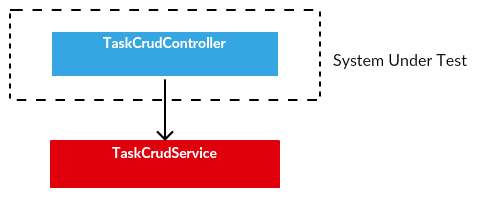
The problem of this approach is that we might end up writing shallow unit tests, especially if the tested class has no business logic. For example, if we are writing unit tests for a Spring MVC controller and we replace its dependencies with test doubles, we cannot write write unit tests for our business logic. We can only ensure that:
- Our HTTP request is processed by the correct controller function.
- Our validation rules are working as expected.
- The correct data is passed forward to the expected service function.
- The system under test returns the expected HTTP response.
This time we are going to do something totally different. We will increase the size of the tested unit and replace the dependencies of our service component with test doubles. The goal of this experiment is to help us to see if this approach helps us to write more meaningful unit tests for a Spring REST API.
The following figure illustrates the size of the tested unit when we use this approach:
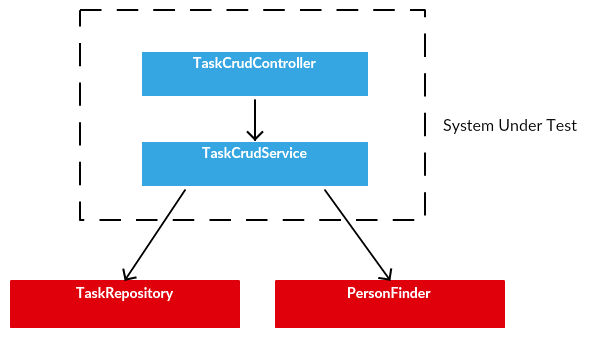
We can now configure the system under test by following these steps:
First, we have to create a new test class and ensure that its test functions are run when we run our unit tests. After we have created our test class, its source code looks as follows:
1import org.junit.jupiter.api.DisplayName
2import org.junit.jupiter.api.Tag
3
4@Tag("unitTest")
5@DisplayName("Perform CRUD operations for tasks")
6class TaskCrudControllerTest {
7
8}
Second, we have to add three private and lateinit properties to our test class:
- The
PersonFinderclass finds person data from the database. - The
TaskRepositoryclass provides CRUD operations for tasks. - The
TaskCrudRequestBuilderclass creates HTTP requests and sends these requests to the system under test.
After we have added these properties to our test class, its source code looks as follows:
 1import org.junit.jupiter.api.DisplayName
 2import org.junit.jupiter.api.Tag
 3
 4@Tag("unitTest")
 5@DisplayName("Perform CRUD operations for tasks")
 6class TaskCrudControllerTest {
 7
 8    private lateinit var personFinder: PersonFinder
 9    private lateinit var repository: TaskRepository
10    private lateinit var requestBuilder: TaskCrudRequestBuilder
11}
Third, we have to add a new setup function to our test class and ensure that this function is invoked before a test function is run. After we have added this function to our test class, its source code looks as follows:
 1import org.junit.jupiter.api.BeforeEach
 2import org.junit.jupiter.api.DisplayName
 3import org.junit.jupiter.api.Tag
 4
 5@Tag("unitTest")
 6@DisplayName("Perform CRUD operations for tasks")
 7class TaskCrudControllerTest {
 8
 9    private lateinit var personFinder: PersonFinder
10    private lateinit var repository: TaskRepository
11    private lateinit var requestBuilder: TaskCrudRequestBuilder
12
13    @BeforeEach
14    fun configureSystemUnderTest() {
15
16    }
17}
Fourth, we have to implement our setup function by following these steps:
- Create
PersonFinderandTaskRepositorymocks and store the created mock objects in thepersonFinderandrepositoryproperties. - Create a new
TaskCrudServiceobject and store the created object in a local variable. - Create a new
MockMvcobject by using the standalone configuration and store the created object in a local variable. - Create a new
TaskCrudRequestBuilderobject and store the created object in therequestBuilderproperty.
After we have implemented our setup function, the source code of our test class looks as follows:
 1import io.mockk.mockk
 2import org.junit.jupiter.api.BeforeEach
 3import org.junit.jupiter.api.DisplayName
 4import org.junit.jupiter.api.Tag
 5import org.springframework.test.web.servlet.setup.MockMvcBuilders
 6
 7@Tag("unitTest")
 8@DisplayName("Perform CRUD operations for tasks")
 9class TaskCrudControllerTest {
10
11    private lateinit var personFinder: PersonFinder
12    private lateinit var repository: TaskRepository
13    private lateinit var requestBuilder: TaskCrudRequestBuilder
14
15    @BeforeEach
16    fun configureSystemUnderTest() {
17        personFinder = mockk()
18        repository = mockk()
19        val service = TaskCrudService(personFinder, repository)
20
21        val mockMvc = MockMvcBuilders
22                .standaloneSetup(TaskCrudController(service))
23                .setControllerAdvice(TaskErrorHandler())
24                .setLocaleResolver(WebTestConfig.fixedLocaleResolver())
25                .setMessageConverters(
26                        WebTestConfig.objectMapperHttpMessageConverter()
27                )
28                .build()
29        requestBuilder = TaskCrudRequestBuilder(mockMvc)
30    }
31}
We can now configure the system under test by using the standalone configuration. Let’s summarize what we learned from this lesson.
Summary
This lesson has taught us three things:
- We can configure the system under test without writing duplicate code by using an object mother class that creates and configures all components which are added to the system under test.
- We can send HTTP requests to the system under test without writing duplicate code by using a request builder class.
- If we want to configure the system under test by using the standalone configuration, we have to invoke the
standaloneSetup()method of theMockMvcBuildersclass.