Writing Security Tests for Spring MVC Controllers
After we have finished this lesson, we
- Know what kind of test data we should use when we write security tests for Spring MVC controllers.
- Understand how we can add a CSRF token into an HTTP request.
- Can configure the authenticated user that is used when an HTTP request is send to the tested controller method.
This lesson assumes that:
Introduction to System Under Test
The security requirements of our example application are:
- Our application must have two user roles:
ROLE_USERandROLE_ADMIN. - The
ROLE_ADMINcontains all access rights granted to the user role:ROLE_USER. - Only authenticated users who have the role:
ROLE_USERare allowed to access our application.
Also, we added a new database table called: user_accounts into our database. This table contains the information of the users of our example application. After we have added this database table into our database, the database of our example application looks as follows:
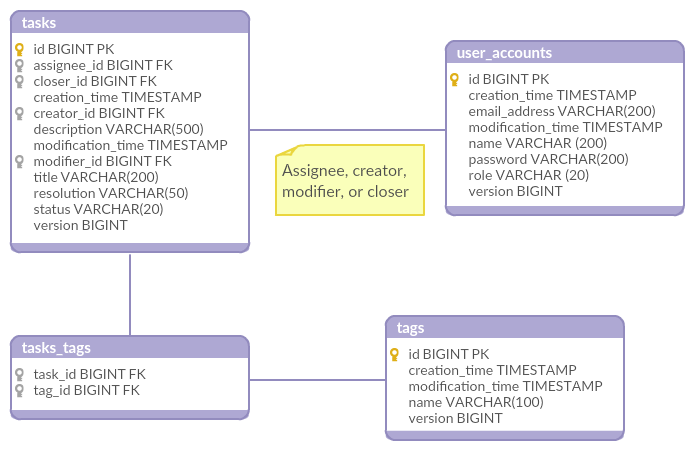
Next, we will create the DbUnit data set that initializes our database into a known state.
Creating the DbUnit Data Set
We will insert the required user data into our database by creating a new DbUnit data set because the user_accounts table doesn’t belong to the same logical section as the tasks, tags, and tasks_tags tables.
Also, because our application has two user roles, we have to create a data set that inserts two rows into the user_accounts table. The name of this data set is users.xml, and its content looks as follows:
 1<dataset>
 2    <user_accounts id="1"
 3                   creation_time="2017-02-11 11:41:28"
 4                   email_address="john.doe@gmail.com"
 5                   is_enabled="true"
 6                   modification_time="2017-02-11 11:41:28"
 7                   name="John Doe"
 8                   password="user"
 9                   role="ROLE_USER"
10                   version="0"/>
11    <user_accounts id="2"
12                   creation_time="2017-02-11 11:41:28"
13                   email_address="anne.admin@gmail.com"
14                   is_enabled="true"
15                   modification_time="2017-02-11 11:41:28"
16                   name="Anne Admin"
17                   password="admin"
18                   role="ROLE_ADMIN"
19                   version="0"/>
20</dataset>
com.testwithspring.intermediate package that contains other common DbUnit data sets as well.
Next, we will find out how we can create the constant class that contains the test data that is inserted into the user_accounts table.
Using Our Test Data in Our Test Code
We can create the required constant class by following these steps:
- Create a
publicandfinalclass called:Usersand ensure that we cannot createUsersobjects. - Declare the constants that contain the information of the user who has the role
ROLE_USER. - Declare the constants that contain the information of the user who has the role
ROLE_ADMIN.
After we he have created our constant class, its source code looks as follows:
 1public final class Users {
 2
 3    private Users() {}
 4
 5    public static class JohnDoe {
 6
 7        public static final Long ID = 1L;
 8        public static final String EMAIL_ADDRESS = "john.doe@gmail.com";
 9        public static final String NAME = "John Doe";
10        public static final String PASSWORD = "user";
11        public static final UserRole ROLE = UserRole.ROLE_USER;
12    }
13
14    public static class AnneAdmin {
15
16        public static final Long ID = 2L;
17        public static final String EMAIL_ADDRESS = "anne.admin@gmail.com";
18        public static final String NAME = "Anne Admin";
19    }
20}
There are two things that I want to point out:
- I gave “real” names to our inner classes because these names are often easier to read and remember than boring and technically correct names (
RegisteredUserandAdministrator). - The
JohnDoeandAnneAdmininner classes declare different constants because theUsersclass contains only the test data that is used in our integration tests.
We are now ready to write security tests for Spring MVC controllers. Let’s find out how we can do it.
Writing Security Tests for Spring MVC Controllers
During this lesson we will modify an existing integration test which verifies that the tested controller method returns the HTTP status code 200 when an existing task is deleted from the database. Our new integration tests ensures that the HTTP status code 200 is returned when John Doe deletes an existing task.
Let’s start by initializing our database into a known state.
Initializing Our Database Into a Known State
We have to ensure that the content of the users.xml data set is inserted into our database before our test methods are run. We can do this by setting multiple data sets as the value of the @DatabaseSetup annotation’s value attribute.
After we have configured the required DbUnit data sets, the source code of our integration test class looks as follows:
 1import com.github.springtestdbunit.DbUnitTestExecutionListener;
 2import com.github.springtestdbunit.annotation.DatabaseSetup;
 3import com.github.springtestdbunit.annotation.DbUnitConfiguration;
 4import org.junit.Before;
 5import org.junit.Test;
 6import org.junit.experimental.categories.Category;
 7import org.junit.runner.RunWith;
 8import org.springframework.beans.factory.annotation.Autowired;
 9import org.springframework.security.test.context.support.WithSecurityContextTestExecutionListener;
10import org.springframework.test.context.ActiveProfiles;
11import org.springframework.test.context.ContextConfiguration;
12import org.springframework.test.context.TestExecutionListeners;
13import org.springframework.test.context.junit4.SpringJUnit4ClassRunner;
14import org.springframework.test.context.support.DependencyInjectionTestExecutionListener;
15import org.springframework.test.context.transaction.TransactionalTestExecutionListener;
16import org.springframework.test.context.web.ServletTestExecutionListener;
17import org.springframework.test.context.web.WebAppConfiguration;
18import org.springframework.test.web.servlet.MockMvc;
19import org.springframework.test.web.servlet.ResultActions;
20import org.springframework.test.web.servlet.setup.MockMvcBuilders;
21import org.springframework.web.context.WebApplicationContext;
22
23import static org.springframework.security.test.web.servlet.setup.SecurityMockMvcConfigurers.springSecurity;
24import static org.springframework.test.web.servlet.request.MockMvcRequestBuilders.delete;
25import static org.springframework.test.web.servlet.result.MockMvcResultMatchers.*;
26
27@RunWith(SpringJUnit4ClassRunner.class)
28@ContextConfiguration(classes = {IntegrationTestContext.class})
29@WebAppConfiguration
30@TestExecutionListeners({
31        DependencyInjectionTestExecutionListener.class,
32        TransactionalTestExecutionListener.class,
33        DbUnitTestExecutionListener.class,
34        ServletTestExecutionListener.class,
35        WithSecurityContextTestExecutionListener.class
36})
37@DatabaseSetup({
38        "/com/testwithspring/intermediate/users.xml",
39        "/com/testwithspring/intermediate/tasks.xml"
40})
41@DbUnitConfiguration(dataSetLoader = ReplacementDataSetLoader.class)
42@Category(IntegrationTest.class)
43@ActiveProfiles(Profiles.INTEGRATION_TEST)
44public class DeleteTaskAsUserWhenTaskIsFoundTest {
45
46    @Autowired
47    private WebApplicationContext webAppContext;
48
49    private MockMvc mockMvc;
50
51    @Before
52    public void configureSystemUnderTest() {
53        mockMvc = MockMvcBuilders.webAppContextSetup(webAppContext)
54                .apply(springSecurity())
55                .build();
56    }
57
58    @Test
59    public void shouldReturnHttpStatusCodeOk() throws Exception {
60        deleteTask()
61                .andExpect(status().isOk());
62    }
63
64    private ResultActions deleteTask() throws Exception {
65        return  mockMvc.perform(delete("/api/task/{taskId}",
66                Tasks.WriteLesson.ID
67        ));
68    }
69}
If we run our integration test, we notice that it fails because the HTTP status code 403 (forbidden) is returned. The reason for this is that our request doesn’t contain a valid CSRF token.
Let’s find out how we can add this token into our HTTP request.
Adding a Valid CSRF Token Into Our HTTP Request
If we are using the CSRF protection provided by Spring Security, we have to add a valid CSRF token into our HTTP request if we send a DELETE, PATCH, POST, or PUT request to the tested controller method.
Additional Reading:
We can add this token into our HTTP request by using the CsrfRequestPostProcessor class. This class creates a valid CSRF token and adds this token into the HTTP request that is send to tested controller method.
After we have ensured that our HTTP request contains a valid CSRF Token, the source code of our integration test class looks as follows:
 1import com.github.springtestdbunit.DbUnitTestExecutionListener;
 2import com.github.springtestdbunit.annotation.DatabaseSetup;
 3import com.github.springtestdbunit.annotation.DbUnitConfiguration;
 4import org.junit.Before;
 5import org.junit.Test;
 6import org.junit.experimental.categories.Category;
 7import org.junit.runner.RunWith;
 8import org.springframework.beans.factory.annotation.Autowired;
 9import org.springframework.security.test.context.support.WithSecurityContextTestExecutionListener;
10import org.springframework.test.context.ActiveProfiles;
11import org.springframework.test.context.ContextConfiguration;
12import org.springframework.test.context.TestExecutionListeners;
13import org.springframework.test.context.junit4.SpringJUnit4ClassRunner;
14import org.springframework.test.context.support.DependencyInjectionTestExecutionListener;
15import org.springframework.test.context.transaction.TransactionalTestExecutionListener;
16import org.springframework.test.context.web.ServletTestExecutionListener;
17import org.springframework.test.context.web.WebAppConfiguration;
18import org.springframework.test.web.servlet.MockMvc;
19import org.springframework.test.web.servlet.ResultActions;
20import org.springframework.test.web.servlet.setup.MockMvcBuilders;
21import org.springframework.web.context.WebApplicationContext;
22
23import static org.springframework.security.test.web.servlet.request.SecurityMockMvcRequestPostProcessors.csrf;
24import static org.springframework.security.test.web.servlet.setup.SecurityMockMvcConfigurers.springSecurity;
25import static org.springframework.test.web.servlet.request.MockMvcRequestBuilders.delete;
26import static org.springframework.test.web.servlet.result.MockMvcResultMatchers.*;
27
28@RunWith(SpringJUnit4ClassRunner.class)
29@ContextConfiguration(classes = {IntegrationTestContext.class})
30@WebAppConfiguration
31@TestExecutionListeners({
32        DependencyInjectionTestExecutionListener.class,
33        TransactionalTestExecutionListener.class,
34        DbUnitTestExecutionListener.class,
35        ServletTestExecutionListener.class,
36        WithSecurityContextTestExecutionListener.class
37})
38@DatabaseSetup({
39        "/com/testwithspring/intermediate/users.xml",
40        "/com/testwithspring/intermediate/tasks.xml"
41})
42@DbUnitConfiguration(dataSetLoader = ReplacementDataSetLoader.class)
43@Category(IntegrationTest.class)
44@ActiveProfiles(Profiles.INTEGRATION_TEST)
45public class DeleteTaskAsUserWhenTaskIsFoundTest {
46
47    @Autowired
48    private WebApplicationContext webAppContext;
49
50    private MockMvc mockMvc;
51
52    @Before
53    public void configureSystemUnderTest() {
54        mockMvc = MockMvcBuilders.webAppContextSetup(webAppContext)
55                .apply(springSecurity())
56                .build();
57    }
58
59    @Test
60    public void shouldReturnHttpStatusCodeOk() throws Exception {
61        deleteTask()
62                .andExpect(status().isOk());
63    }
64
65    private ResultActions deleteTask() throws Exception {
66        return  mockMvc.perform(delete("/api/task/{taskId}", Tasks.WriteLesson.ID)
67                .with(csrf())
68        );
69    }
70}
Additional Reading:
When we run this integration test, we notice that it fails because the HTTP status code 401 (unauthorized) is returned. The reason for this is that because we haven’t configured the authenticated user, Spring Security doesn’t allow our user to perform the requested operation because anonymous users cannot use our application.
Let’s move on and find out how we can configure the authenticated user.
Configuring the Authenticated User
The MockMvc support of Spring Security provides three annotations that allow us to configure the authenticated user. These annotations are:
- The
@WithAnonymousUserannotation allows us to set anAnonymousAuthenticationTokento the used security context before a test method is run. I don’t typically use this annotation because it is not required, but it is useful if we want run most of our test methods by using a specific user and create a few test methods that use an anonymous user. - The
@WithMockUserannotation allows us to configure the username, the user roles, and the password of the user whose information is set to the security context before a test method is run. - The
@WithUserDetailsannotation allows us the configure the username of the user whose information is loaded by using theUserDetailsServicebean. After the user has been loaded, the loaded user is set to the security context before a test method is run.
Most of the time I use the @WithUserDetails annotation because it helps me to write more realistic integration tests. Also, there are two situations when we should configure the authenticated user by using the @WithUserDetails annotation:
- If we save auditing information into our database, and we want to write assertions for this information.
- We have created a custom
UserDetailsclass, and the tested code uses this class.
In other words, when we want to configure the authenticated user, we have to annotate our test method with the @WithUserDetails annotation and configure the username of the authenticated user.
After we have configured the authenticated user, the source code of our test class looks as follows:
 1import com.github.springtestdbunit.DbUnitTestExecutionListener;
 2import com.github.springtestdbunit.annotation.DatabaseSetup;
 3import com.github.springtestdbunit.annotation.DbUnitConfiguration;
 4import org.junit.Before;
 5import org.junit.Test;
 6import org.junit.experimental.categories.Category;
 7import org.junit.runner.RunWith;
 8import org.springframework.beans.factory.annotation.Autowired;
 9import org.springframework.security.test.context.support.WithSecurityContextTestExecutionListener;
10import org.springframework.security.test.context.support.WithUserDetails;
11import org.springframework.test.context.ActiveProfiles;
12import org.springframework.test.context.ContextConfiguration;
13import org.springframework.test.context.TestExecutionListeners;
14import org.springframework.test.context.junit4.SpringJUnit4ClassRunner;
15import org.springframework.test.context.support.DependencyInjectionTestExecutionListener;
16import org.springframework.test.context.transaction.TransactionalTestExecutionListener;
17import org.springframework.test.context.web.ServletTestExecutionListener;
18import org.springframework.test.context.web.WebAppConfiguration;
19import org.springframework.test.web.servlet.MockMvc;
20import org.springframework.test.web.servlet.ResultActions;
21import org.springframework.test.web.servlet.setup.MockMvcBuilders;
22import org.springframework.web.context.WebApplicationContext;
23
24import static org.springframework.security.test.web.servlet.request.SecurityMockMvcRequestPostProcessors.csrf;
25import static org.springframework.security.test.web.servlet.setup.SecurityMockMvcConfigurers.springSecurity;
26import static org.springframework.test.web.servlet.request.MockMvcRequestBuilders.delete;
27import static org.springframework.test.web.servlet.result.MockMvcResultMatchers.*;
28
29@RunWith(SpringJUnit4ClassRunner.class)
30@ContextConfiguration(classes = {IntegrationTestContext.class})
31@WebAppConfiguration
32@TestExecutionListeners({
33        DependencyInjectionTestExecutionListener.class,
34        TransactionalTestExecutionListener.class,
35        DbUnitTestExecutionListener.class,
36        ServletTestExecutionListener.class,
37        WithSecurityContextTestExecutionListener.class
38})
39@DatabaseSetup({
40        "/com/testwithspring/intermediate/users.xml",
41        "/com/testwithspring/intermediate/tasks.xml"
42})
43@DbUnitConfiguration(dataSetLoader = ReplacementDataSetLoader.class)
44@Category(IntegrationTest.class)
45@ActiveProfiles(Profiles.INTEGRATION_TEST)
46public class DeleteTaskAsUserWhenTaskIsFoundTest {
47
48    @Autowired
49    private WebApplicationContext webAppContext;
50
51    private MockMvc mockMvc;
52
53    @Before
54    public void configureSystemUnderTest() {
55        mockMvc = MockMvcBuilders.webAppContextSetup(webAppContext)
56                .apply(springSecurity())
57                .build();
58    }
59
60    @Test
61    @WithUserDetails(Users.JohnDoe.EMAIL_ADDRESS)
62    public void shouldReturnHttpStatusCodeOk() throws Exception {
63        deleteTask()
64                .andExpect(status().isOk());
65    }
66
67    private ResultActions deleteTask() throws Exception {
68        return  mockMvc.perform(delete("/api/task/{taskId}", Tasks.WriteLesson.ID)
69                .with(csrf())
70        );
71    }
72}
Before we continue, I want to mention that you can add any of these three annotations to a test class or to a test method. I like to add these annotations to a test method, but you are naturally free to make your own choices.
Additional Reading:
When we run our integration test, we notice that it passes.
We have now written our first security test. Remember to check the example applications of this lesson because they help you to understand how you can write security tests for real web applications.
Let’s summarize what we learned from this lesson.
Summary
This lesson has taught us four things:
- We should create a DbUnit data set that inserts all different users into our database before our integration tests are run.
- We can add a valid CSRF token into an HTTP request by using the
CsrfRequestPostProcessorclass. - We should configure the authenticated users by using the
@WithUserDetailsannotation. - We can add the
@WithUserDetailsannotation to a test class or to a test method.