Introduction to DbUnit
After we have finished this lesson, we
- Know what DbUnit is.
- Can get the required dependencies with Maven and Gradle.
- Know how we can create data sets that inserts data into the used database.
- Can create data sets which verify that the expected information is found from the database.
What Is DbUnit?
DbUnit is a JUnit extension which provides support for automated tests that either read information from the used database or save information to it. The most commonly used DbUnit features are:
- Specify the test data by using XML data sets.
- Initialize the used database into a known state before the test methods are run.
- Write assertions for the data that is found from the used database after a test method has been run.
- Replace placeholders found from the data set files with the actual values.
Let’s find out how we can get the required dependencies with Maven and Gradle.
Getting the Required Dependencies
Before we can write integration tests which use DbUnit, we have to declare the DbUnit dependency in our build script.
If we are using Maven, we have to add the following snippet into our pom.xml file:
1<dependency>
2    <groupId>org.dbunit</groupId>
3    <artifactId>dbunit</artifactId>
4    <version>2.5.2</version>
5	<scope>test</version>
6</dependency>
If we are using Gradle, we have to add the following snippet into our build.gradle file:
1testCompile(
2	'org.dbunit:dbunit:2.5.2'
3)
Let’s move on and take a look at DbUnit data sets.
Introduction to DbUnit Data Sets
This course uses the flat XML data sets because they are easier to read and write than the data sets which use the original XML data set format. We can create our data sets by following these rules:
- The data set file must have a root element called:
dataset. - The root element can have multiple child elements.
- Each child element corresponds to a single table row. The name of the child element specifies the name of the database table.
- The attributes of each element describe the column values of the specified table row.
- If we want to specify that a database table has no rows, we have to add an element which has no attributes into our data set.
We are familiar with the basics. Next, we will take a look at the database of our example application.
Introduction to the Database of Our Example Application
The following figure describes the structure of the database of our example application:
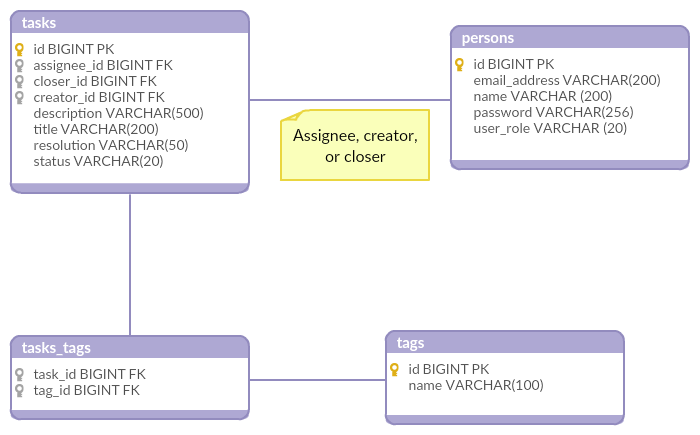
As we can see, our database has four tables that are described in the following:
First, the persons table contains the information of the persons who use our task tracker. This table has the following columns:
- The
idcolumn identifies the person. - The
email_addresscolumn contains the email address of the person. - The
namecolumn contains the name of the person. - The
passwordcolumn contains the password of the person. - The
rolecolumn contains the user role of the person.
Second, the tasks table contains the information of our tasks. This table has the following columns:
- The
idcolumn identifies each task. - The
assignee_idcolumn defines the assignee of the task. - The
closer_idcolumn identifies the closer of the task. - The
creator_idcolumn identifies the creator of the task. - The
descriptioncolumn contains the description of the task. - The
titlecolumn contains the title of the task. - The
statuscolumn contains the status of the task. - The
resolutioncolumn contains the resolution of the task.
Third, the tags table contains the tags that can be added to a task. This table has the following columns:
- The
idcolumn identifies the tag in question. - The
namecolumn contains the name of the tag.
Fourth, the tasks_tags table is link table that links tasks with tags. This table has the following columns:
- The
task_idcolumn identifies the task. - The
tag_idcolumn identifies the tag.
Let’s move on and find out how we can create DbUnit data sets that insert information into our database.
Inserting Data Into Our Database
Let’s take a look at three examples that demonstrate how we can insert data into our database.
Example 1: Open Task That Has No Tags
If we want to ensure that our database has one open task that has no tags, we can use the following DbUnit data set:
1<dataset>
2	<tasks id="1"
3		   creator_id="4"
4		   description="bar"
5		   title="foo"
6		   status="OPEN"/>
7	<tags/>
8	<tasks_tags/>
9</dataset>
When we use this data set, DbUnit performs the following operations:
First, it deletes all rows found from the database tables that are specified in our data set. These tables are cleaned in reverse order. In other words, DbUnit cleans our database tables in this order: tasks_tags, tags, and tasks.
Second, it inserts one row into the tasks table. The invoked INSERT statement is:
1INSERT INTO tasks
2		(id, creator_id, description, title, status)
3	VALUES
4		(1, 4, 'bar', 'foo', 'OPEN');
As we can see, the column values that are not specified by the tasks XML element will be NULL.
Example 2: An Open Task That Has One Tag
If we want to ensure that our database has one open task that has one tag, we have to use the following data set:
 1<dataset>
 2	<tasks id="1"
 3		   creator_id="4"
 4		   description="bar"
 5		   title="foo"
 6		   status="OPEN"/>
 7	<tags id="1"
 8		  name="Easy"/>
 9	<tasks_tags task_id="1"
10				tag_id="1"/>
11</dataset>
When we use this data set, DbUnit performs the following operations:
First, DbUnit cleans our database tables in this order: tasks_tags, tags, and tasks.
Second, DbUnit inserts the content of our data set into database. DbUnit inserts this information into our database by using the order in which the table rows are specified. In other words, it invokes the following INSERT statements:
 1INSERT INTO tasks
 2		(id, creator_id, description, title, status)
 3	VALUES
 4		(1, 4, 'bar', 'foo', 'OPEN');
 5
 6INSERT INTO tags
 7		(id, name)
 8	VALUES
 9		(1, 'EASY');
10
11INSERT INTO tasks_tags
12		(task_id, tag_id)
13	VALUES
14		(1, 1);
In other words, if we want to avoid problems caused by foreign keys, we must specify our table rows in the correct order.
Example 3: Two Tasks
If we want to ensure that our database has two tasks and the second task has been assigned to a person, we have to use the following data set:
 1<dataset>
 2    <tasks id="1"
 3           creator_id="4"
 4           description="bar"
 5           title="foo"
 6           status="OPEN"/>
 7	<tasks id="2"
 8		   assignee_id="1"
 9		   creator_id="4"
10		   description="John Doe will do this."
11		   title="Assigned task"
12		   status="OPEN"/>
13    <tags/>
14    <tasks_tags/>
15</dataset>
It should be clear that DbUnit cleans the tables that are found from our data set before it inserts any data into our database.
Because the tasks elements found from our data set have different attributes, the data that is inserted into our database depends from the “column sensing” feature provided by DbUnit.
First, if we haven’t enabled column sensing, the first tasks element that is found from our data set specifies the populated columns. In other words, DbUnit invokes the following INSERT statements:
1INSERT INTO tasks
2		(id, creator_id, description, title, status)
3	VALUES
4		(1, 4, 'bar', 'foo', 'OPEN');
5
6INSERT INTO tasks
7		(id, creator_id, description, title, status)
8	VALUES
9		(2, 4, 'John Doe will do this.', 'Assigned task', 'OPEN');
Second, if we have enabled column sensing, DbUnit reads the whole data set file before it determines the populated columns. If we use column sensing, DbUnit invokes the following INSERT statements:
1INSERT INTO tasks
2		(id, assignee_id, creator_id, description, title, status)
3	VALUES
4		(1, NULL, 4, 'bar', 'foo', 'OPEN');
5
6INSERT INTO tasks
7		(id, assignee_id, creator_id, description, title, status)
8	VALUES
9		(2, 1, 4, 'John Doe will do this.', 'Assigned task', 'OPEN');
We are now able to create data sets that insert data into our database. Let’s find out how we can write assertions for the data found from our database.
Writing Assertions for the Data Found From Our Database
Let’s take a look at two examples that demonstrate how we can write assertions for the data that is found from the database.
Example 1: One Task That Has No Tags
If we want to verify that our database contains an open task that has not been assigned to anyone and it doesn’t have any tags, we have to use the following DbUnit data set:
1<dataset>
2	<tasks id="1"
3		   creator_id="1"
4		   description="bar"
5		   title="foo"
6		   status="OPEN"/>
7	<tags/>
8	<tasks_tags/>
9</dataset>
When we use this data set, DbUnit ensures that:
- The
tasks_tagstable has zero rows. - The
tagstable has zero rows. - The
taskstable has one row that contains the expected information. If a column value of a database table is not specified, DbUnit simply ignores this column. In other words, this data set doesn’t verify the values of theassignee_id,creator_id,closer_id, andresolutioncolumns.
If we want to verify that the value of a certain column is null, we have to use a so called replacement data set. We will talk more about this in the next lessons of this topic.
Example 2: Two Tasks
If we want to ensure that our database has two tasks and the second task has been assigned to a person, we have to use the following data set:
 1<dataset>
 2    <tasks id="1"
 3           creator_id="4"
 4           description="bar"
 5           title="foo"
 6           status="OPEN"/>
 7	<tasks id="2"
 8		   creator_id="4"
 9		   description="John Doe will do this."
10		   title="Assigned task"
11		   status="OPEN"/>
12    <tags/>
13    <tasks_tags/>
14</dataset>
When we use this data set, DbUnit ensures that:
- The
tasks_tagstable has zero rows. - The
tagstable has zero rows. - The
taskstable has two rows that contain the expected information.
However, if we take a closer look at our data set, we notice that the second task doesn’t specify the value of the assignee_id column. The reason for this is that when we are writing assertions for the data found from the database, the expected rows cannot specify different columns. This is quite annoying, but luckily we can solve this problem by using replacement data sets.
Let’s summarize what we learned from this lesson.
Summary
This lesson has taught us five things:
- DbUnit is a JUnit extension that helps us to write automated tests which use a relational database.
- When we insert data into our database, DbUnit cleans the tables found from our data set in reverse order.
- When we insert data into our database, DbUnit invokes the
INSERTstatements by using the order in which we specify the table rows. - When we write assertions for the data found from our database, DbUnit ignores column values that are not specified in our data set.
- By default, DbUnit doesn’t allow us to write proper assertions for multiple rows of the same database table if these rows specify column values for different columns.