Creating Spies With Spock Framework
After we have finished this lesson, we:
- Can get the required dependencies with Maven and Gradle.
- Know how we can create spies with Spock Framework.
- Understand how we can verify the interactions that happened between the system specification and a spy.
- Can stub the methods of a spy.
This lesson assumes that:
Introduction to System Under Specification
During this lesson we will create a spy that wraps a class which implements the MessageRepository interface and use this spy when we specify the expected behavior of the MessageService class. The name of this class is MessageRepositoryImpl, and its methods are described in the following:
- The
findById()method creates a newMessageobject, sets theidandmessageTextof the created message, and returns anOptionalobject that contains the createdMessageobject. - The
save()method sets theidof theMessageobject given as a method parameter and returns thatMessageobject.
The source code of the MessageRepositoryImpl class looks as follows:
 1import org.slf4j.Logger;
 2import org.slf4j.LoggerFactory;
 3
 4import java.util.Optional;
 5
 6class MessageRepositoryImpl implements MessageRepository {
 7
 8    private static final Logger LOGGER = LoggerFactory
 9            .getLogger(MessageRepositoryImpl.class);
10
11    MessageRepositoryImpl() {}
12
13    @Override
14    public Optional<Message> findById(Long id) {
15        LOGGER.info("Finding message by id: {}", id);
16
17        Message found = new Message();
18        found.setId(id);
19        found.setMessageText("Hello from Spy!");
20
21        return Optional.of(found);
22    }
23
24    @Override
25    public Message save(Message message) {
26        LOGGER.info("Saving a message with information: {}", message);
27
28        message.setId(3L);
29
30        return message;
31    }
32}
As we can see, both methods write information to the log file. This helps us to see if the real method is invoked when the system under specification invokes a method of our spy.
Because the MessageService class and the TaskRepository interface were described in the previous lessons of this topic, I won’t repeat myself here. If you need to refresh your memory, I recommend that you take a look at the following lessons:
Let’s move on and find out how we can get the required dependencies with Maven and Gradle.
Getting the Required Dependencies
Because spies are always based on a real object, we have to add either byte-buddy 1.6.4 (or newer) or cglib-nodep 3.2 (or newer) to the classpath. If we don’t do this, Spock Framework will throw a CannotCreateMockException when we try to create a new spy.
Let’s find out how we can add the byte-buddy dependency to our classpath when we are using either Maven or Gradle.
If we are using Maven, we have to add the following snippet to our pom.xml file:
1<dependency>
2	<groupId>net.bytebuddy</groupId>
3	<artifactId>byte-buddy</artifactId>
4	<version>1.7.1</version>
5	<scope>test</scope>
6</dependency>
If we are using Gradle, we have to add the following snippet to our build.gradle file:
1testCompile(
2	//Other dependencies are omitted
3	'net.bytebuddy:byte-buddy:1.7.1'
4)
Next, we will find out how we can create spies with Spock Framework.
Creating Spies With Spock Framework
We can create a spy with Spock Framework by using the Spy() method of the MockingApi class. This method returns the created spy object. When we specify the method parameters of this method, typically we will use one of these two options:
- We can pass the type of a class as a method parameter. When we do this, we have to also provide the constructor arguments required by the used constructor. If we don’t provide any constructor arguments, Spock Framework will use the default constructor of the class.
- We can pass an instantiated object as a method parameter. This is a good choice if we cannot control the instantiation of the object we want to spy. For example, our objects might be instantiated by an IoC container.
Let’s create a new MessageRepositoryImpl spy by using the default constructor of the MessageRepositoryImpl class and use this spy when we create a new MessageService object. After we have configured the system under specification, the source code of our specification class looks as follows:
1import org.junit.experimental.categories.Category
2import spock.lang.Specification
3
4@Category(UnitTest.class)
5class MessageServiceSpec extends Specification {
6
7    def repository = Spy(MessageRepositoryImpl)
8    def service = new MessageService(repository)
9}
Additional Reading:
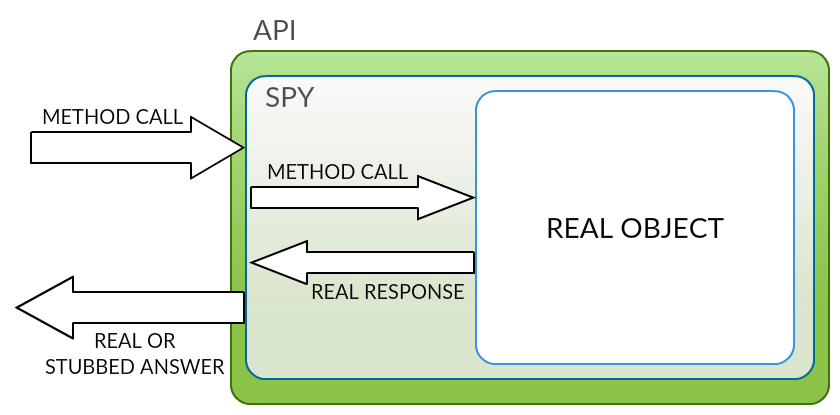
When we create a spy with Spock Framework, Spock Framework creates a wrapper that has the same API as the real object. Also, the created spy delegates all method calls to the real object. In other words, when we invoke a method of a spy, the spy records the information of this method invocation and invokes the correct method of the real object. The value that is returned by the real object is returned back to the object that invoked the method of the spy.
The following figure illustrates how a spy works:
Let’s move on and find out how we can verify the interactions that happened between the system under specification and a spy.
Verifying Interactions
If we want to verify the interactions that happened between the system under specification and a spy, we can use the techniques that were described in the lesson: Creating Mocks With Spock Framework . That’s why I won’t repeat myself here.
However, we will take a look at one example that demonstrates how we can verify the interactions that happened between the system under specification and a spy. Let’s ensure that save() method of the MessageRepositoryImpl spy was invoked once when we created a new message and that the Message object given as a method parameter has the correct message text.
After we have specified the expected interaction, the source code of our specification class looks as follows:
 1import org.junit.experimental.categories.Category
 2import spock.lang.Specification
 3
 4@Category(UnitTest.class)
 5class MessageServiceSpec extends Specification {
 6
 7    def repository = Spy(MessageRepositoryImpl)
 8    def service = new MessageService(repository)
 9
10    def 'Verify that a message was saved with the correct message text'() {
11
12        given: 'We want to create a new message'
13        def message = new Message()
14        message.messageText = 'Hello World!'
15
16        when: 'We create a new message'
17        service.create(message)
18
19        then: 'Should save a message that has the correct message text'
20        1 * repository.save({ it.messageText == 'Hello World!' })
21    }
22}
Next, we will find out how we can stub the methods of a spy.
Stubbing Method Behavior
If we want to stub the methods of a spy, we have to know these three things:
- If we stub a method of a spy, the method of the real object is not invoked when the system under specification invokes the stubbed method.
- When we want to mock and stub the same interaction (aka method invocation), we have to use one interaction. This means that we have to verify the expected interaction and configure the response of that interaction at the same time.
- This is a powerful and very controversial technique, and it can be useful if we are dealing with legacy code that was not designed to be tested. Also, I think that we shouldn’t use this technique if we are working on a greenfield project.
When we want to stub the methods of a spy, we can use the techniques that were described in the previous lessons of this topic. That’s why I won’t repeat myself here. However, we will take a look at one example that demonstrates how we can verify the expected interaction and configure the response of that interaction.
Our job is to write a feature method that specifies the behavior of the create() method of the MessageService class. Our feature method is almost ready, but we still have to verify the expected interaction and configure the response of that interaction. We can finish our feature method by following these steps:
- Ensure that the
save()method of theMessageRepositoryImplspy was invoked once when we created a new message. - Implement a closure that sets the
idof the savedMessageobject and returns the saved object.
After we have verified the expected interaction and configured the response of that interaction, the source code of our specification class looks as follows:
 1import org.junit.experimental.categories.Category
 2import spock.lang.Specification
 3
 4@Category(UnitTest.class)
 5class MessageServiceSpec extends Specification {
 6
 7    def repository = Spy(MessageRepositoryImpl)
 8    def service = new MessageService(repository)
 9
10    def 'Verify that a message was saved and return the method parameter'() {
11
12        given: 'We want to create a new message'
13        def message = new Message()
14        message.messageText = 'Hello World!'
15
16        when: 'We create a new message'
17        def returned = service.create(message)
18
19        then: 'Should save the message and return the saved message'
20        1 * repository.save(message) >> { Message saved ->
21            saved.id = 1L
22            return saved
23        }
24
25        and: 'Should return the found message with correct id'
26        returned.id == 1L
27
28        and: 'Should return the found message with correct message text'
29        returned.messageText == 'Hello World!'
30    }
31}
If you want to see more examples, you should read the source code of our example application or take a look at the previous lessons of this topic.
Additional Reading:
We can now create spies with Spock Framework, configure the expected interactions, and configure the response of a stubbed method. Let’s summarize what we learned from this lesson.
Summary
This lesson has taught us five things:
- Because spies are always based on a real object, we have to add either
byte-buddyorcglib-nodepdependency to the classpath. - We can create a spy by using the
Spy()method of theMockingApiclass. - If the system under specification invokes a method of a spy, the spy records the information of this method invocation and invokes the correct method of the real object.
- If we stub a method of a spy, the real method is not invoked when the system under specification invokes the stubbed method.
- If we want to mock and stub the same method invocation, we have to verify the expected interaction and configure the response of that interaction at the same time.