Creating Spies With Mockito
After we have finished this lesson, we:
- Understand what is the difference between a mock and a spy.
- Know how we can create spies with Mockito.
- We can stub method behavior and verify interactions with Mockito.
This lesson assumes that:
A Spy Is Not a Mock
Before we can create spies with Mockito, we must understand that spies which are created with Mockito are a bit different than the “traditional” spies we discussed earlier and the mock objects created with Mockito. The best way to demonstrate this difference is to compare mocks and spies.
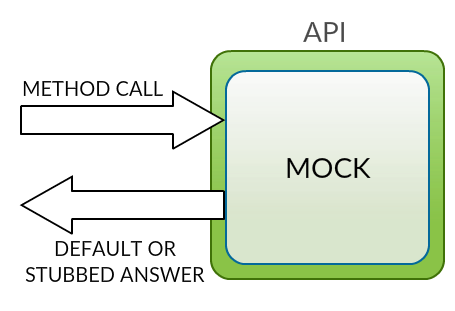
First, when we create a mock with Mockito, Mockito doesn’t create a real instance of the object. It creates an instance of the class that has the same API as the real object, but it doesn’t invoke the real methods. Instead, our mock object returns either the Mockito’s default answer, the answer we configured when we created the mock object, or a stubbed answer.
The following figure demonstrates how a mock works:
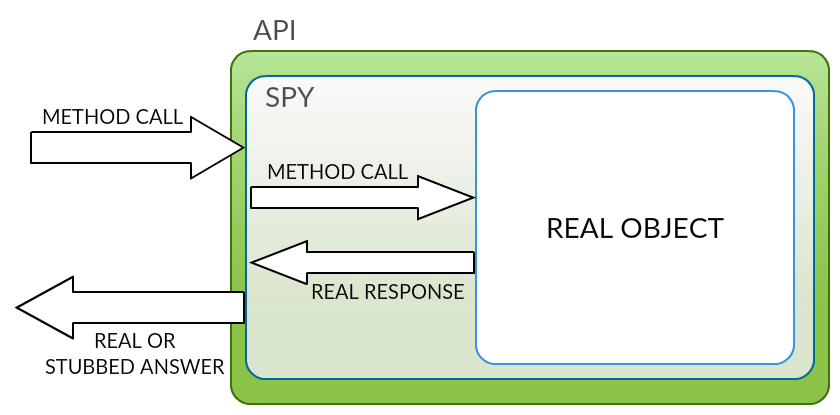
Second, when we create a spy with Mockito, Mockito creates a wrapper that has the same API as the real object and that delegates all method calls to the real object. In other words, when we invoke a method of a spy, the spy records the information of this method invocation and invokes the correct method of the real object.
The following figure demonstrates how a spy works:
When we talked about “classical” spies, I said that we cannot stub the method behavior of a spy. However, we can stub a method of a spy that is created with Mockito. If we stub a method of a spy, the spy doesn’t invoke the real method when the stubbed method is invoked by the system under test. This is a powerful and very controversial technique, and it can be useful if we dealing with legacy code that was not designed to be tested.
Let’s move on and take a look at the system under test.
Introduction to System Under Test
During this lesson we will create a spy that wraps a class which implements the TaskRepository interface. The name of this class is: TaskRepositoryImpl and each method of the TaskRepository interface is implemented by following these requirements:
- The method logs the invoked method and its method parameter to a log file.
- The method returns an empty response.
TaskRepository interface was described in the lesson: Creating Stubs With Mockito
.
The source code of the TaskRepositoryImpl class looks as follows:
 1import org.slf4j.Logger;
 2import org.slf4j.LoggerFactory;
 3
 4import java.util.Optional;
 5
 6public class TaskRepositoryImpl implements TaskRepository {
 7
 8    private static final Logger LOGGER = LoggerFactory
 9			.getLogger(TaskRepositoryImpl.class);
10
11    public TaskRepositoryImpl() {}
12
13    @Override
14    public long count() {
15        LOGGER.info("Invoked count() method");
16        return 0;
17    }
18
19    @Override
20    public void delete(Task task) {
21        LOGGER.info("Invoked delete() method with task: {}");
22    }
23
24    @Override
25    public Optional<Task> findById(Long id) {
26        LOGGER.info("Invoked findById() method with id: {}", id);
27        return Optional.empty();
28    }
29
30    @Override
31    public Task save(Task task) {
32        LOGGER.info("Invoked save() method with task: {}", task);
33        return null;
34    }
35}
Let’s find out how we can create a spy that wraps a TaskRepositoryImpl object with Mockito.
Creating Spies With Mockito
The Mockito class provides two static spy() methods that we can use for creating spies with Mockito. These methods can be used for two different purpose:
- If we want to create a spy that wraps an abstract class, we have to invoke the
spy()method and pass aClassobject which identifies the type of the created spy as a method parameter. - If we want to create a spy that wraps an object, we have to invoke the
spy()method and pass the wrapped object as a method parameter.
Additional Reading:
As we know, the test doubles that are created with Mockito are not stateless. That is why we have to create our spy before a test method is invoked. We can do this by creating our spy in a setup method that is annotated with the @Before annotation.
Because we want to create a spy that wraps a real object, we have to invoke the spy() method of the Mockito class and pass a new TaskRepositoryImpl object as a method parameter. Also, we don’t have to add a new factory method into the TestDoubles class because it is crystal clear that the spy() method creates a spy object.
After we have done this, the source code of our test class looks as follows:
 1import org.junit.Before;
 2
 3import static org.mockito.Mockito.spy;
 4
 5public class MockitoSpyTest {
 6
 7    private TaskRepository repository;
 8
 9    @Before
10    public void createSpy() {
11        repository = spy(new TaskRepositoryImpl());
12    }
13}
After we have created our spy, we can stub its methods and verify interactions that happened between the system under test and our spy. Let’s start by finding out how we can stub method behavior of a spy.
Stubbing Method Behavior of a Spy
When we want to stub the method behavior of a spy, we cannot use the normal syntax provided by the Mockito and BDDMockito classes, because this syntax forces us to configure the stubbed method by invoking it. If we use this syntax, our spy will invoke the real method of the wrapped object.
That is why we have to execute the required steps in reverse order.
Additional Reading:
For example, if we want to stub the findById() method of the TaskRepository interface and ensure that it returns a non-empty Optional object when it is invoked by using the method parameter 1L, we have to follow these steps:
- Specify the returned value by invoking the
willReturn()method of theBDDMockitoclass. When we invoke this method, we have to pass the returned value or object as a method parameter. - Specify the spy whose behavior we want to configure by invoking the
given()method of theBDDStubberinterface. When we invoke this method, we have to pass our spy object as a method parameter. - Specify the stubbed method call by invoking the stubbed method. When we invoke the stubbed method, we have to specify the expected method parameters.
After we have stubbed the findById() method of our spy, the source code of our test method looks as follows:
 1import org.junit.Before;
 2import org.junit.Test;
 3
 4import java.util.Optional;
 5
 6import static com.testwithspring.task.TestDoubles.dummy;
 7import static org.assertj.core.api.Assertions.assertThat;
 8import static org.mockito.BDDMockito.willReturn;
 9import static org.mockito.Mockito.spy;
10
11public class BDDMockitoSpyStubTest {
12
13    private TaskRepository repository;
14
15    @Before
16    public void createSpy() {
17        repository = spy(new TaskRepositoryImpl());
18    }
19
20    @Test
21    public void shouldReturnObject() {
22        Task expected = dummy(Task.class);
23        willReturn(Optional.of(expected)).given(repository).findById(1L);
24
25        Optional<Task> actual = repository.findById(1L);
26
27        assertThat(actual).containsSame(expected);
28    }
29}
When we run this test method, we notice that the findById() method of the TaskRepositoryImpl class was not invoked by the system under test.
If we want to use the original Mockito API, we have to follow the same steps but invoke different methods. We can configure the returned value by invoking the doReturn() method of the Mockito class and specify the spy whose behavior we want to configure by invoking the when() method of the Stubber interface.
The code that uses the original Mockito API, looks as follows:
1doReturn(Optional.of(expected)).when(repository).findById(1L);
Because I have already described the “reverse” syntax in the lesson: Creating Strict Stubs With Mockito , I won’t introduce any more examples in this lesson. Also, the example application of this lesson provides a lot of examples that demonstrate how we can stub methods of a spy.
Let’s move on and find out how we can verify interactions that happened between the system under test and our spy.
Verifying Interactions With Mockito
We can verify the interactions that happened or did not happen between the system under test and our spy by using the syntax that was described in the lesson: Creating Mocks With Mockito .
For example, if we want to verify that the system under test invoked a method of our spy only one time, we have to follow these steps:
- Configure the verified spy by by invoking the
verify()method of theMockitoclass. When we invoke this method, we have to pass a spy object as a method parameter. - Configure the invoked method by invoking it. If the invoked method has method parameters, we have to configure the expected method parameters when we configure the invoked method.
If we want to verify that the findById() method of the TaskRepository interface was invoked once and 1L was passed as a method parameter, we have to write a unit test that looks as follows:
 1import org.junit.Before;
 2import org.junit.Test;
 3
 4import static org.mockito.Mockito.spy;
 5import static org.mockito.Mockito.verify;
 6
 7public class MockitoSpyVerifyTest {
 8
 9    private TaskRepository repository;
10
11    @Before
12    public void createSpy() {
13        repository = spy(new TaskRepositoryImpl());
14    }
15
16    @Test
17    public void verifyWhenMethodWasCalledOnce() {
18        repository.findById(1L);
19
20        verify(repository).findById(1L);
21    }
22}
We can now create a spy with Mockito, stub the methods of a spy, and verify interactions that happened or did not happen between the system under test and a spy.
Let’s summarize what we learned from this lesson
Summary
This lesson has taught us four things:
- A spy that is created with Mockito wraps the real object and invokes its method if we haven’t stubbed the invoked method.
- We can create spies with Mockito by using the
spy()method of the Mockito class. - If we want to stub a method of a spy, we have to execute the required steps in reverse order.
- We can use the same syntax for verifying the interactions that happened or did not happen between the system under test and a test double if the test double is either a mock or a spy.